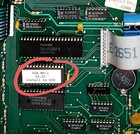
This chip will update your Alesis GT to the most current firmware version available for this hardware. OS 1.03
Important Upgrade Information
1. This chip is for GT models only. It will not work with non-GT models!
2. Check your current OS version. With your Alesis GT turned on, hold down the Up and Down/page buttons at the same time. If you see a version number that us lower than 1.03, you can benefit from this upgrade.
3. Installing this chip backwards will damage both your Alesis and the chip. Be sure to note the proper orientation of the notch in the existing chip before you proceed.
Install Instructions
1. Shut down your Alesis and disconnect power
2. Carefully open the cover of your Alesis to expose the circuit board.
3. Find chip "U30". This is the chip you need to swap. Be sure to note the orientation of the notch on the chip.
Recommended - Take a picture too, just in case you forget!
4. Pull the chip straight out with the chip puller tool ensuring not to bend any pins.
5. Install the new chip in the same slot ensuring you have the notch pointing in the same direction.
Note - You may need to carefully bend the chip legs slightly to align them with the socket holes.
6. Reinstall the cover, power up, and enjoy