




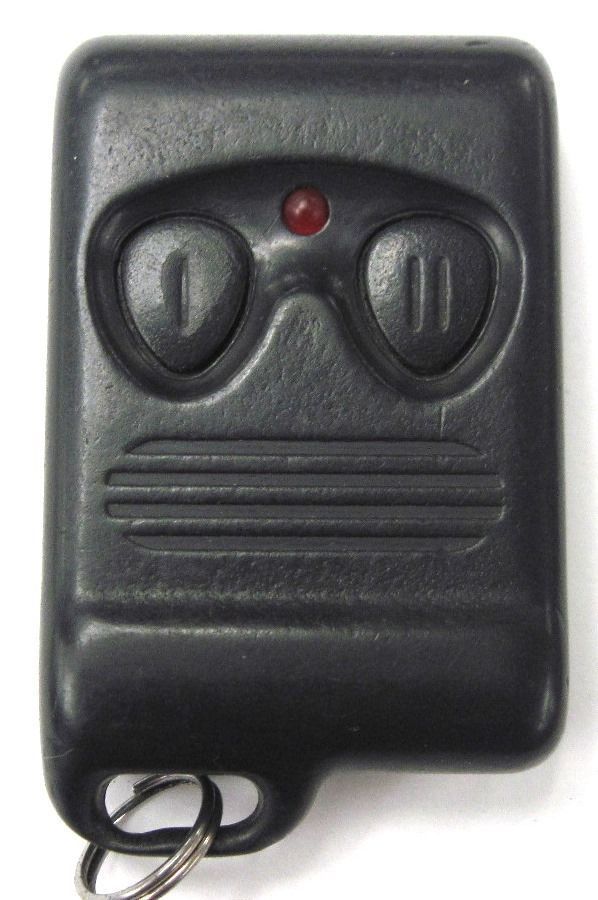


Stock Photo
See pictures for an example of what you will receive.
One (1)
Aftermarket Security Installed System remote keyless
entry fob alarm controller
Transmitter control clicker keyfob clicker beeper
Keychain keyfab car door opener security
Device Keybob fab fob replacement
Delta Baretta ICD Aamp Quinn Matador
|
FCC ID: J5523518T1 Interchangeable FCC ID #’s: J5523518T1 J5523518RT1 H5LAL777A Circuit Board #: PTX3 Interchangeable circuit board #s: PTX3 PT20 LED Light Color: Red Buttons: 2; Lock/Unlock Frequency: 303 -304 MHz Battery: 1; GP23A See Item Specifications for more details
|
|
Compatible with the following Aftermarket installed security systems: PT20 VS 350 CS-2000DPII-TW2 (On Guard™ Alarm Systems) CS-2000.DP.TW2 (FM) (On Guard™ Alarm Systems -Optional (1) 1-Way) + PLUS Many MORE – just match your FCC ID #’s |
|
Programming Instructions: METHOD #1: You will need two things 1. the remote control 2. Valet Switch (aka: programming switch) (you will see a single Push button switch – typically red or blue button and in the kick panel area under front driver’s dash) To program – you have about 15 seconds… Can program up to 4 transmitters (program sequentially at the same time) 1. Get in vehicle 2. Key in Ignition 3. TURN ignition ON OFF ON OFF ON (leave on) 4. Lights in vehicle will flash leave key on 5. Grab valet switch 6. Push (hold down) button for 5 seconds 7. You will either hear a chirp or see a light flash – let go 8. Grab transmitter (first to program) & hold down lock button until you either hear a chirp or see a light flash – let go 9. Grab 2nd remote & hold down lock button until you either hear a chirp or see a light flash – let go 10. Grab 3rd remote – & hold down lock button until you either hear a chirp or see a light flash – let go 11. Grab 4th remote & hold down lock button until you either hear a chirp or see a light flash – let go 12. Typically, about a 15 second window to do all of this in 13. To exit program, turn key off
MEHTOD #2: Programming Instructions: This system uses Code Learning to learn up to 3 different transmitter codes. TO PROGRAM TRANSMITTERS TO ALARM:1) Turn ignition switch ON then OFF 3 times quickly 2) (on/off, on/off, on/off) until siren chirps once. 3) Leave ignition ON. 2) Push & Hold the Valet switch. The siren chirps 3 times.The system is now in programming mode.3) Press BUTTON #1 on the transmitter- siren chirps once to confirm programming. Press BUTTON #1 on another transmitter within 5 seconds to program a second remote control.NOTE #1If only one transmitter is being programmed, continue holding BUTTON #1 until Siren chirps a second time. This means the system has exited program mode. Hold the transmitter button until the siren chirps the 2nd time to prevent unauthorized code and noise from entering system.NOTE #2Program Mode is exited automatically after 5 seconds of last code transmission or once 3 new codes have been programmed. System will disarm after programming. Disarm using any valid transmitter.4) Turn Ignition to OFF.NOTE: When programming ALL remotes must be relearned! |
How to find out if this remote is compatible with your Vehicles’ installed RKE System
If you're not sure your vehicle can use this remote, please ask questions or contact your local dealer first.
1. Check the back of your current or old keyless remote to match FCC ID /Part #’s.
2. Contact your local dealer and tell them your VIN# and ask what part # / FCC ID you need.
Your vehicle will be installed with one of the following keyless entry systems:
a. Standard Keyless Remote Packages: Installed at time of manufacture.
b. Optional Keyless Remote Packages: Installed by a dealer.
c. Aftermarket Keyless Remote Packages: Installed by previous owner or a car/audio shop.
d. No remote keyless entry system at all.
The
above information can change which remote you need
for your installed remote keyless system.
Payment: We accept payment via PayPal or Credit Card. Please contact us via eBay messages for any questions concerning payments. Payment is expected within 5 days.
PA SALES TAX: As per the State of PA Franchise Board we must collect sales tax from PA Residents for any purchase made from our store.
Contact/Email: Due to scams etc, we DO NOT respond to emails. We only read/respond to EBAY MESSAGES. Messages & Best Offers are checked throughout the day & we typically respond 7 days a week. Please contact us with questions via eBay messages (keyless4u).
100% Guarantee Remote Shipping / Return Policy
Warranty/Returns:
- We have a 30 day return policy.
- All returns for replacements and refund need an RMA #.
- Please contact us before returning items so we can give you the RMA # and the proper return address.
- No refunds / replacements will be granted without an RMA#
We ensure proper working condition of all previously used or new remotes through a serious of tests performed with the Santronics Testing device. Each button is tested for functionality prior to shipment and then logged.
Please Note: Each remote and circuit board is UV id’d prior to shipment – All returns receive a UV ID inspection to verify originality of remote sent prior to refund or replacement.
Does this keyless remote entry come with a battery?
Yes. It will have a working battery installed.
Battery Condition:
A. All remotes sold on Keyless4u include working batteries.
B. Installed batteries are not tested for battery life- they are simply working.
Some are new and some are used.
.
.
.
.


