





DESCRIPTION
Veepeak OBDCheck BLE Bluetooth OBD II Scanner Car Check Engine For iOS & Android
- GENERIC OBD-II FUNCTIONS – Find out why the check engine light is on; read & clear trouble codes, view freeze frame data, I/M readiness, and live sensor data to help monitor vehicle health and diagnose check engine problems.
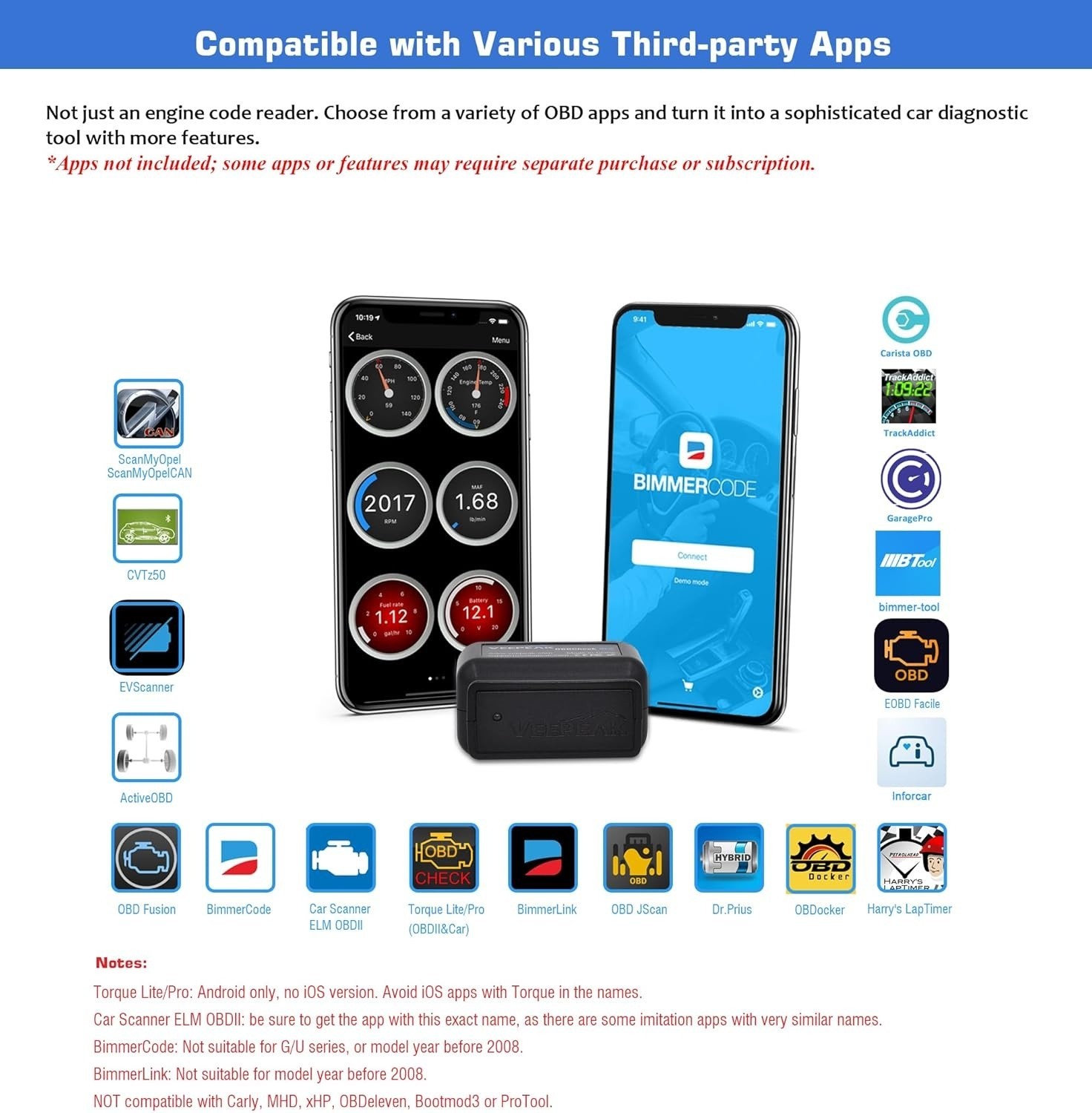
- COMPATIBLE WITH POPULAR THIRD-PARTY APPS: Car Scanner ELM OBD2, OBD Fusion, Torque (Android only), Infocar, BimmerCode*, BimmerLink*, OBD JScan, Dr. Prius, OBDocker, etc. Note: some Apps or in-App features require separate purchase. See image for details.
- VEHICLE COMPATIBILITY: Compatible with most 1996+ cars and light trucks in the US for standard OBD-II functions. For EVs, check in Car Scanner App or contact Veepeak to confirm compatibility before purchase. Not all EVs are supported.
- COMPATIBLE WITH IOS & ANDROID: Supports Bluetooth LE and Classic Bluetooth for Android, and Bluetooth LE for iOS devices. Bluetooth LE requires direct in-app connection; do not connect in Bluetooth settings. Android head units may not be supported.
- *APP LIMITATIONS: When used with BimmerCode, only 2008+ E, F, I, and 2008+ R series are supported (pre-2008 models or G/U series not supported). Not suitable for pre-2008 models for BimmerLink. NOT compatible with Carly, MHD, xHP, ProTool, bootmod3, etc. Avoid Apps with names that imitate “Torque” or “Car Scanner.”
- Advanced diagnostics (ABS, SRS, TPMS, etc.) and data (like transmission temperature) are only available for some makes/models via specific apps. MS-CAN, and advanced functions like service reset, relearning are NOT supported. Please refer to product description, User Guide, or contact Veepeak to check availability. (Usually NOT free for advanced diagnostics or features)
More Than An OBD II Diagnostic Tool
Know Your Vehicle Better
The vehicle in your garage can be as smart as your phone. Turn your iOS or Android phone or tablet into a sophisticated diagnostic scan tool and real-time performance monitor. The OBDCheck BLE directly plugs into your vehicle and connects to an OBD II App on your iOS or Android device via Bluetooth. Whenever you have a check engine light on or want to see how your car is performing, it will be a very useful gadget for you.
Compatible Apps (NOT included; some Apps or features require separate purchase)
- OBD Fusion : Check engine light diagnostics, create customized dashboards, plus enhanced diagnostics & PIDs for selected vehicles.
- CAR SCANNER ELM OBD22: See what your car is doing in realtime, get OBD fault codes, car performance, sensor data and more!
- Torque Lite/Pro (OBD 2 & Car): Popular vehicle performance, sensors and diagnostics tool. Android only, no iOS version.
- BimmerCode: Supports 2008+ E, F, I, and 2008+ R series; pre-2008 models & G/U series (G01, G03, G20, G30, U11, U12 etc.) NOT supported
- BimmerLink: Read trouble codes, display real-time sensor values, or register a new battery after replacement and more for BMW model year 2008+. U series not fully supported.
- OBD JScan: Read diagnostic trouble codes and live data in all modules for selected Jeep/ Dodge vehicles.
- Dr. Prius: Examine the health of the High Voltage battery for Toyota/Lexus hybrid owners.
- More Advanced Apps : Compatible with Carista, bimmer-tool, OBDocker, GaragePro, ABRP (iOS version), AlfaOBD, ActiveOBD, FORScan Lite (no MS CAN support) etc. (Please check the app page for detailed features & fees)
- Incompatible Apps or Software: Carly, MHD, xHP, ProTool, ABRP Android version, bootmod3, Multiecuscan, Techstream, VCDS, etc.
- Important Note: Avoid Apps with names that imitate “Torque” or “Car Scanner” to ensure proper functionality and avoid unnecessary charges.
Specifications
- Communication Method: Bluetooth LE for iOS, Bluetooth LE or Classic Bluetooth for Android. Bluetooth LE requires direct in-app connection; regular Bluetooth pairing is not needed.
- Operating Voltage/Current: 9V~16V, Max 45mA
- Dimension : 1.61" x 1.97" x 0.87"
- Supported OBD II protocols: J1850 PWM, J1850 VPW, ISO9141-2, ISO14230-4 (KWP2000), and ISO 15765-4 (CAN)
- Compatible Vehicles: USA - 1996+, Canada – 1998+, Mexico – 2006+, EU – 2001+ (gas), 2004+ (diesel). Apply to generic OBD II functionalities (check engine light diagnostics only).
- EV Compatibility: Please refer to the EV Compatibility Guide in the user guide, or contact Veepeak to check. Not all EVs are supported.
- Supported Functions: Standard OBD-II diagnostics, live sensor data, I/M readiness, and advanced diagnostics & extended data for selected makes and models via specific Apps.
- Advanced Diagnostics : Please refer to the Advanced Diagnostic Availability chart in the user guide, or contact Veepeak to confirm.
- Unsupported Functions: Oil light & other service reset, relearning, adaptation, coding and other advanced functions.
Common Issues and Troubleshooting
1. Device does not power up (no blue light).
First check if the cigar fuse of your vehicle is in good condition to provide power. You can also try with another vehicle to verify.
2. When I try to connect “VEEPEAK” with my iPhone or iPad, it tells me it is not supported.
You will see this error when trying to connect from iOS Bluetooth Settings. This device uses Bluetooth LE for iOS devices and requires connecting in the App. Please restart your iOS device so “VEEPEAK” shows up again, then start the OBD App and connect in the App (refer to the setup guide in product images or user guide).
3. Could not pair my Android device with “VEEPEAK”.
Turn off Bluetooth and turn it back on. Try pairing a few more times; Turn off WiFi & cellular data and try again; Disconnect other Bluetooth devices; Restart your Android device; Clear Bluetooth data cache (Settings > Apps > More options > Show system apps > Bluetooth > Storage> Clear data); For Android 13+, go to Settings->Apps->App Battery Usage, Select Show System in the menu, Select Bluetooth, then select Unrestricted. Go back and select Bluetooth Legacy, and select Unrestricted also. For Car Scanner ELM OBD2 or Infocar App, you can initiate the Bluetooth pairing in App settings.
4. App not connecting to Veepeak device.
Make sure the App is compatible, and you have made the correct App connection settings and granted the App permissions (including Bluetooth for iOS, nearby devices for Android); Remove and re-install the app (especially when you have an OS update or the App is not used for some time); Try with a different App.
5. Cannot connect to vehicle/ECU.
Make sure the OBD port is in good condition and the device fits well in it. Try to push it a little harder into the OBD port if the contact is loose as powering up does not always mean a good fit. Make sure your vehicle is OBD II compliant, and ignition is turned ON; Check if your vehicle is supported by the App; Try it on another vehicle.
Shipping & Handling
Orders are processed within 2 to 7 business days, excluding weekends and holidays.
Standard U.S. shipping usually takes 3 to 9 business days.
International shipping averages 6 to 12 business days, with some destinations up to 15 days.
Terms of Sale
Payments from unverified PayPal accounts or suspected fraudulent activity may be declined.
Listings may end early if there are issues with the item.
Please provide clear photos if you receive a defective or wrong item for refund or reshipment.
Shipping fees are non-refundable.
Feedback Policy
Positive feedback will be left after payment is received.
If satisfied, your 5-star rating and feedback are greatly appreciated.
Contact us first if you have any issues before leaving neutral or negative feedback.
Contact Us
Feel free to message us on eBay. We aim to respond within 24 to 48 business hours.